Photo Jottings - Page 39 of 127 - Photography equipment expertise

You probably clicked on this page because you’re trying to find the right Sony camera and related equipment to help you take better pictures, but may not really know what to choose.  Below is a list of items that I find particularly useful, and personally recommend, because I own most of them.  This isn’t my personal wish list, it’s stuff I use on a daily or weekly basis. I also find the products below offer a high degree of value—price vs performance, both for the novice, and photographers at the intermediate and pro levels.  


2014/s55z18sm.jpg


The Sony Zeiss ‘FE’ mount 55mm F/1.8 performs great, even wide open.  Right now, easily the best prime for FE cameras.  For full frame cameras, but works very well on aps-c cameras like the A6000 etc.


Review                    More info

2014/sa6kwls.jpg


I bought this model (with kit lens) for back-up use to the A7 series I currently have, and it’s hard to tell the difference between the two unless you look closely!  It’s basically an NEX-7 but better.  If you don’t need all the bells and whistles of the A6000, get the A5100.


Body only    with kit lens

2012/cz2418rc.jpg


The little Sony CZ NEX 24mm F/1.8 is a top notch lens, one of the best performing Sony lenses I’ve ever reviewed.  This one is a must for your NEX-7, with an equivalent focal length of 36mm (in 135 film format), it makes a great landscape or  low-light walk around lens.

Review                    More info

2012/g1xlensrc2.jpg

The Canon G1X is the best pocket zoom camera period.  I bought my review copy, and use it for everything except professional work, well actually I have used it for paying photography, such as Real Estate, and find it really works well, as good as a DSLR, although the 28mm equivalent starting length is a little long sometimes.  This camera would be perfect for people wanting to learn the finer points of photography as it works great in ‘auto’ mode, and has a sharp lens, low noise, and beautiful colors.  No need to shoot RAW and waste time fiddling with settings that won’t make the picture any better.  Spend your time on composition and lighting, and let the camera make the other decisions.  Get the newer G1X MII version for a wider and faster lens.


Check price      Review 

APRIL2011/nex16rgp.jpg


The Sony NEX 16mm F/2.8 is a super small lens, and allows you to put the camera in your pants pocket.  It’s not tack sharp at any aperture, but it does a good job considering the size.  There are a couple of neat accessories for this lens too, like the fisheye adapter, and wide-angle converter, which covers 12mm, or the equivalent of 18mm.


If you just want a pancake wide angle lens, get the much sharper20mm F2.8.


Review                    More info

2012/sn5018boxrc.jpg


The Sony NEX 50mm F/1.8 OSS is another top quality lens for your NEX camera, it will handle 24mp better than Sony’s full frame 50/1.4.  The CZ 24/1.8 and 50/1.8 OSS are currently the only two Sony NEX lenses that are optically good enough for the NEX-7.  Hopefully, more will come soon.


Review                    More info

2012summer/rok8mmftxsm.jpg


This NEX fisheye lens is the best I’ve ever tested period!  The mid-sections and corners are quite sharp even when used wide open, which is great—most fisheye lenses are mushy outside the centers unless stopped down hard!  It’s a manual use lens, but read the review to find out how easy it is to use.  For ‘E’ mount system only.


Review                    More info

Janfeb2011/SAL35F18rg.jpg


The Sony DT 35mm F/1.8 is my favorite prime lens period.  If you only have enough money to get one good lens for your APS-C camera, this is it.  This lens is so good it would be a bargain at twice the price.


Review                    More info

2012/s1650mmrc.jpg


The Sony DT 16-50mm F/2.8 is my number one pick for a medium zoom, and may be the only lens you’ll need if you’re not a big zoom person.  Excellent image quality, and fast F/2.8 all the way.  A great alternative to the more expensive (and slower) CZ 16-80mm F/3.5-4.5.


The differences between the CZ 16-80mm and the 16-50mm are very small, the only real thing is the longer focal length for the CZ.  For me it’s a toss-up as to which one a person should get.  If you do some low-light shooting, and like wide to medium focal lengths, I’d recommend the 16-50mm.  If you mostly shoot in daylight, and like the longer end, get the CZ 16-80mm.


Review                    More info

Janfeb2011/DT50F18rg.jpg


The Sony DT 50mm F/1.8 provides very good image quality, is small and light, and most importantly, inexpensive.  If you look at your images all day on the computer blown up to 100%, go with the more expensive Sony 50mm F/1.4, as seen farther down the page.


Review                    More info

2012/t70300rc.jpg


Here’s a lens that performs (optically) as good as the Sony version, for half the cost!  You don’t get the focus hold and limiter switches, but it does have a quiet ultra-sonic (SSM) type focusing motor. If you’re on a budget, this lens is far more economical than Sony’s 70-300mm G SSM, a result of Sony pushing the lens price envelope a bit too much in my opinion.  Also, I’ve been hearing from readers that the SSM system on the Sony 70-300mm may cease to function for no reason at all.  I can confirm that as my brand new review copy worked all of five minutes before it broke!  Buy this lens from a reputable dealer (allows returns) and I’d recommend it over the Sony with no reservations.


Review                    More info  

Janfeb2011/400rg.jpg


The Sony 70-400mm F/4-5.6 “G” is my favorite super telephoto zoom lens period, and is far superior in image and build quality to any other Sony zoom lens, bar the Sony 70-200mm F/2.8.  It is expensive, but worth every penny in my opinion.


Review                    Original version   Version II

APRIL2011/tam70200kit.jpg


The Tamron 70-200mm F/2.8 is a super alternative to the more expensive Sony 70-200mm F/2.8.  Image quality is about the same on each lens, although the Sony has a better build quality and faster focusing.  If you’re interested in optical performance only, the Tamron is a great buy, and will save you a bunch of money.


Review                    More info

Janfeb2011/s50rg.jpg


The Sony 50mm F/1.4 makes a great landscape or walk around lens, and is the least expensive full-frame fast lens in the Sony line-up.  A classic that should be in every photographer’s bag.


Review                    More info

JUNE2011/sig50hsmsdsmss.jpg


The Sigma 50mm F/1.4 is much bigger and heavier than the Sony above, but much sharper at large apertures.  If you require very sharp centers at F/1.4-2.8, the Sigma is your lens, it’s stunningly sharp in the centers at F/1.4.  If you’re a landscape shooter, and will be using smaller apertures, there isn’t much difference between the Sigma and Sony.


Review                    More info

Janfeb2011/SAL85F28rg.jpg


The Sony 85mm F/2.8  is small, light-weight, and easy on the pocket book.  Don’t be fooled, this cheap lens provides excellent image quality, and would be a welcome addition to your bag of goodies, either full-frame or APS-C.


Review                    More info

Wedding and party photographers (and regular photographers too!) may want to check out the items below, both do a good job of diffusing the light from a direct flash blast, and make the subject in your pictures look a little better.  I purchased the Gary Fong lightshpere a couple of years ago, and it actually works well, although it looks funny and somewhat unprofessional.  Expect people to ask why you have a Tupperware® container on your flash!

JUNE2011/rfbbox.jpg
Rogue flashbender, large reflector
JUNE2011/rfbup.jpg
Rogue flashbender, mounted.

First up is the Rogue Flashbender large reflector, its reflective white material measures about 8.50″ x 8.75″ or 216 x 222mm, but the listed official size is 10″ x 11″ or 254 x 280mm.  It has three bendable strips sewn inside, which allows it to be formed into various shapes and positions, including using it as a snoot, see image farther down the page or look at the first image, in the lower right corner.  It attaches to any size flash head with a snap and velcro band, and seems very secure even when hanging down.  A slightly smaller version is available too.

Gary Fong Lightsphere

JUNE2011/gfls.jpg
Gary Fong lightsphere dome
I purchased this Gary Fong lightsphere a couple of years ago, although I don’t think this particular model is still available, (but this one is probably the same with a different mount).  My copy has a fixed opening for the flash head, and fits the Sony HVL-F56AM and F42AM, (and other brands that are similar in size), but the models I see for sale now have a universal opening, meaning they fit all flash heads by way of spreadable tabs and a velcro band.  The size of the Lightsphere is about 4.4″ (115mm) wide at the lid, and 3.25″ (85mm) tall, excluding the mount area.  The dome lid comes off if you want to bounce light out the top.
Results in actual use.
Direct flash
Rogue flashbender
JUNE2011/flsonly.jpg JUNE2011/rfbbounce.jpg
Gary Fong Lightsphere pointed at subject, dome lid on
Gary Fong Lightsphere pointed up, dome lid on
JUNE2011/gfdirect.jpg
JUNE2011/gfofset.jpg

In this shadow comparison I used an off-camera flash in the upper right position from the camera to make the shadows stand out a little more.

The top left shot shows a bare flash only, and produces a pretty dark shadow and hard transition.

The top right shot shows the effect of the Rogue flashbender with the reflector in the curved up position, (second product shot from top), and bouncing the flash off the reflector does seem to soften the shadows quite well.

The bottom left shot is from the Gary Fong Lightshpere, in the position seen in the product shot, which is the dome is pointed straight at the subject.  In this position there isn’t too much light diffusion for some reason, even though the dome is frosted.

The lower right shots shows what happens when the Lightsphere is used in the up position, or dome pointed at the ceiling.  The diffusion is very smooth because the light is bouncing off the walls and ceiling, as well as directly though the frosted and textured side of the sphere.  The walls are white in this room, which makes better use of the flash power, and keeps the color of the subjects correct.  If the walls were painted a darker color, the Lightshpere may cause an undesirable color cast on the subjects because it’s bouncing light in all directions, so the flashbender reflector may be a better choice in that scenario because it’s bouncing flash off the white reflector.  If you’re in the middle of a large room with high ceilings, you won’t have to worry much about color cast issues because at long distances flash intensity is greatly diminished.

The Lightsphere can be used with the dome taken off, which causes more light to be directed through the top to reflect off a ceiling or wall, then back to the subject creating even more light diffusion, but at the expense of flash power.

The camera settings are identical for each shot, however, the flash power was adjusted to match the exposures for each test, with the Gary Fong Lightshpere dome up position using the most power.

JUNE2011/rfbsnoot.jpg
rogue flashbender used as a snoot

Here we have the Rogue Flashbender rolled up to form a snoot.  The flashbender has velcro to secure the ends together.  The exit hole is not usually symmetrical  as you’ll see below.  A snoot keeps light from spreading out and spoiling parts of the image that don’t require extra light, and will reduce shadows in certain situations.

JUNE2011/rfb85mm.jpg
Flash only set at 85mm

This boring shot shows a flash spread using the internal zoom of 85mm at a distance of 3′ or about 1 meter from the wall.  The green tape line on the wall is also about 1 meter in length.

JUNE2011/rfbsnoot85mm.jpg
snoot with flash at 85mm

This is the area covered when using the flash and snoot, with the flash zoom still at 85mm, and using the same power.  You always use the longest zoom possible for your flash unit, because wider zoom positions reduce the light output.  The tight coverage is very useful for lighting areas such as chairs, cabinets or single items that you want to highlight, but do not want light-spill wrecking other areas in the picture.

As a final note: I find the Lightsphere about the only thing Gary Fong puts out that’s any good.  I bought his power snoot, and although it works, it showed the grid lines on even toned surfaces, so I sent it back.  Most Gary Fong stuff is usually overpriced and not worth using in my opinion, the dome Lightshpere is the exception.

Rogue makes some pretty neat products, most of which are actually useful for the average photographer.  The 3 in 1 honeycomb grid is designed to fit over a standard camera accessory flash unit, and provides a way to control the coverage of light that falls on the subject.  Grids are better than snoots, although the difference is sometimes subtle.  check out the photos below.

Grids are used to concentrate light on objects without causing unwanted ‘spill’ light that might over-expose other areas in the scene or cause large, harsh shadows.  They can also project a beam of light for quite a distance so you can keep the stands and flashes out of your pictures.


These Rogue grids will appeal to people that want to take their photography to a higher level, and need something with a small footprint for their camera bag that will hold up to constant use.  People that are still in the experimental stage of photography can fashion a snoot out of a corn flakes box and get acceptable results.  Grids can be made from various lengths of drinking straws glued together and encased in a foam wrap to make them fit over a flash head, although this method may give results closer to a snoot than a grid because of the hole size, length and shape.

The size of the product as mounted on the flash is about 4″ (100mm) long, and 3.6″ (92mm) wide at the front holder.  The individual grids are 2.75″ (70mm) wide, and have 11/64″ (4.5mm) honeycombs.

The whole thing inside the carrying bag measures about 2″ (50mm) deep, 5″ (127mm) long and 4″ (100mm) long.

JUNE2011/rogue3-1boxz.jpg
Rogue 3 in 1 honeycomb grid box contents
JUNE2011/rg31stack.jpg
Rogue grids with holder. Rogue image.
JUNE2011/rg3-1diff.jpg
Rogue grids pattern. Rogue image.
JUNE2011/rgoncam.JPG
Rogue grid mounted on camera flash. Rogue image.
The top image shows what you get in the box; the grid flash strap is under the grids.
The second image shows the two grids and holder, although the Rogue supplied image shows three grids, you get the third by combining the two!  You get a 45°, which is somewhat wide, a 25°, much narrower, and the two combined equal a very tight 16° grid.
The third image shows the pattern and area covered by each grid and the combination.
The last image shows the assembly mounted on a flash unit.
Base image.
JUNE2011/nonex.jpg
Base image, no additional light used


This is our “base” image taken at the studio.  There is only ambient light from a window.  The subject is an orchid arrangement on a table placed close to the wall.


Results using the grids.


Bare flash at 85mm, 1/16 power
45° grid, 1/8 power
JUNE2011/barezz.jpg JUNE2011/grid45zz.jpg
25° grid, 1/8 power
16° grid, 1/8 power
JUNE2011/grid25zz.jpg
JUNE2011/grid16mmzz.jpg
Rogue 16° grid
hand made snoot, 2″ (50mm) exit hole,
JUNE2011/overzz.jpg
JUNE2011/snootsetupzz.jpg


The studio distances are; table center about 18″ (.46m) from the wall with the orchid leaves almost touching the wall.  The flash is about 3′ (1m) to the right, 7′ (2.1m) high, 18″ (.46m) from the back wall and pointed down at the center of the table where the plant is. The flash zoom was set to 85mm for all shots.  The green tape line means nothing; it was left over from another test.


Top row.  The left shot shows a bare flash set to 85mm at 1/16 power.  You can see some of the light spill streaking along the wall, and nothing is really being highlighted, it’s just putting out a broad beam of light.  The right shot uses the 45° grid, which casts an area of light that’s still too large for our small subject, but it does start to make the plant stand out.  I also turned up the flash power as the grid reduced the light output.


Second row.  In the left shot I’ve put a 25° grid on, and the subject is nicely lit, with very little light spill on the wall.  The right shot has the two grids combined, which produces a very tight spot of light, almost too small an area, but more carefully aligned it may look better.


In the last row you can see the flash set-up in relation to the subject.  The left shot shows the 16° grid, the right shot a hand made snoot from a box of corn flakes, wrapped with foil to eliminate the glow from the flash going through the thin cardboard and small openings.  If you look carefully, you’ll see the snoot, even though slightly closer to the subject, is casting some stray light onto the wall; the grid set-up focuses the light beam tightly, enough so that you can see the bright spot it creates below the table.


One thing you have to remember about using a narrow grid is that it needs to be adjusted almost perfectly to avoid a complete “miss” of the subject.


Check out the Rogue 3 in 1 honeycomb grid and help support the site!

2012summer/rok8mmbox.JPG
Box and contents
The Sony NEX-C3 was used for this review.  For a better understanding of terms and methods used in this review, go here.
The usual center, mid-section and corner crops are located at the very bottom of the page.
Introduction.
The diminutive Rokinon 8mm F/2.8 fisheye (for ‘e’ mount) is a special purpose lens, and is made for having fun, so go to the Sony 16mm fisheye review to learn more about how to use this lens, so I don’t have to rehash the same material here.  There is a newer second version out indicated by a ‘II’ in the name.  I think they changed the focus ring grove design, everything else seems to be the same.
On the outside of the lens is an aperture ring, manual focus ring and built-in hood.  It has a bulbous front element, and as a consequence, will not accept filters, nor is there a gel slot in back.  Build quality is actually very good, with a nice fit and finish, although there is a little paint over-spray on the hood tips.  It comes in either silver or black to match your camera, however, the silver is not quite the same as the Sony silver used on ‘e’ mount camera bodies.  Rokinon claims the use of one aspherical element and two ‘ED’ elements in the design of the lens.  Lens hood is stenciled with ‘made in Korea’.
Use.  Make sure you select “enable” for “release W/O lens” on your camera, otherwise, the camera thinks no lens has been mounted, and won’t release the shutter.  This is a manual lens only, meaning there is no communication with the camera, you must use manual focus, and choose an aperture.  Don’t worry though, it meters pretty well in most situations, although I’ve noticed the white balance is more likely to be off than exposure, so check that often and set as necessary.  The best method for daylight use would be to set the lens aperture to F/8-11, and simply set the correct exposure with exposure compensation, or use program auto mode.  At night, set to F/2.8 with a shutter speed of around 1/15sec and use ISO’s to get the appropriate exposure.  Check and review for best results.
The aperture settings are marked in one stop increments from F/2.8-22.  There are half stop clicks between apertures except from F/16 to F/22.  EXIF data reads 0mm for focal length, and F/1 for aperture.  The LCD will read F– with no aperture.
In the box is the lens, front and rear caps, a black vinyl carrying bag and owner’s manual.
Focusing.  Manual focusing only, and it’s damped quite well, almost too much for my taste, but that way it won’t turn accidentally.   Focus ring travel is a little over a 1/4 turn form close-up to infinity.  At F/8-11 and beyond three feet or one meter you won’t have to focus this lens at all, just crank it over to infinity, and forget it.
Requisite product shots.
2012summer/rok8mmft.JPG
Bulbous front element with built in hood
2012summer/rok8mmbk.JPG
Back side, no contacts
2012summer/rok8mmbdy.JPG
Mounted on Sony NEX-C3
2012summer/8mmf28mtf.jpg
Rokinon X-ray view

General information and specifications.

Lens
Rokinon 8mm F/2.8 fisheye E  For Sony ‘e’ mount
Box contents
Front cover, rear cover, vinyl carrying case and users manual.
Cost
Approximately $299
Build quality
Good
Additional information
Introduced in 2012.
Specifications below
Optical configuration
10 elements in 8 groups.
Angle of view
180°.
Aperture
6 blades, semi circular.
Full frame and APS-C
For aps-c only.
Depth of field and focus scales?
Focus distance in feet and meters.
Minimum focus, image plane to subject
About 11″ (280mm)
Minimum focus, end of lens barrel to subject
About 8″  (203mm) distance is from longest hood protrusion.
Hard stop at infinity focus?
No
Length changes when focusing?
N/A
Focus ring turns in AF?
Manual focusing only.
Filter size
Will not accept filters.
Filter ring rotates?
No
Distance encoder?
No
Max magnification
N/A
Min. F/stop
F/22
Sony teleconverter compatible?
No
Length changes when zooming?
N/A
Dimensions WxL  (my measurements)
2.4″ x 2.2″   60mm x 56mm.  Widest at end of hood.
Maximum  extended length (my measurements)
N/A
Weight bare (my scale)
7.6oz  (217g)
Optical qualities summary.
Lens flare/ghosting.  Fair control.  I see some small multi-colored ghosts and dots when the sun is near or inside the image, and sun flare extending well into the frame, but it depends on aperture and light intensity.
Vignetting or light fall-off is not an issue.  Due to the massive coverage of this lens, you’ll experience natural light fall-off when the sun is in the sky.
Color fringing (CA).  Lateral color fringing control is excellent.  I notice a tiny amount of axial type, which goes away as you stop down.
Bokeh.  Awful if you can get it.  Don’t worry about background blur with this lens, unless you focus on something very close with a large aperture.
Color.  Similar to Sony lenses.
Close up filter.  N/A
Coma.  Very small amount in the extreme corners.
Regular filters cannot be used, and there is no rear gel slot.
Filter size.  N/A
Distortion, color fringing and ghosting/flare image below.
2012summer/rok8mmcffull.jpg
Full resized image, F/5.6
Along with the obvious fisheye distortion, I see some sun flare and a few tiny ghosts, although it’s not too noticeable at F/5.6 with a tree covering the sky.

Color fringing.


2012summer/rok8mmcfcr.jpg
This 100% crop comes from the red outlined area from the whole image. There isn’t really any color fringing to see, and that’s great.
Conclusion
The Rokinon 8mm F/2.8 fisheye lens performs superbly; there’s nothing negative to say about it other than sun flare is strong at times, but that may enhance your image depending on the feeling you want to present to the viewer.  This fisheye is very small, lightweight, has almost no color fringing, and is very sharp from F/2.8-8.  It would make a nice low light lens too as it performs great at F/2.8!
If you’re outdoors in daylight, set the aperture around F/8 and focusing to infinity and shoot!  At night, keep it at F/2.8 with a shutter speed of around 1/15sec and use ISO’s to adjust exposures.  If you’re really close to your subject, say within a yard or meter, you may want to stop down the aperture and focus using the distance scale to make sure you have everything in focus; (focus peaking is not all that effective with this lens due to the massive coverage and depth of field, but that’s really a plus in this case).  As I explained in the introduction, you may want to check and adjust your white balance and exposures by reviewing your shots; that’s no big deal, don’t be scared by the all manual operation.
Fisheye lenses are fun to use, just remember when shooting with this type of lens; good results are predicated on good composition, with lighting a distant second.  Check out my boring Sony 16/2.8 fisheye review for ideas, or Flickr for interesting fisheye compositions, some good, some bad.  A fisheye lens is not for ‘getting it all in’ in a general sense, it’s for unique perspectives.


Optically, this fisheye lens is the best I’ve ever tested, and is stunningly sharp at F/2.8!  I’d highly recommend it for ‘e’ mount people.


Sample crops from the centers, mid-sections and corners.


          Center
          Mid-section
             Corner
F/2.8
2012summer/rok8mmctr28.jpg
2012summer/rok8mmmid28.jpg
2012summer/rok8mmcorn28.jpg
F/4
2012summer/rok8mmctr40.jpg
2012summer/rok8mmmid40.jpg
2012summer/rok8mmcorn40.jpg
F/5.6
2012summer/rok8mmctr56.jpg
2012summer/rok8mmmid56.jpg
2012summer/rok8mmcorn56.jpg
F/8
2012summer/rok8mmctr80.jpg
2012summer/rok8mmmid80.jpg
2012summer/rok8mmcorn80.jpg
F/11
2012summer/rok8mmctr11.jpg
2012summer/rok8mmmid11.jpg
2012summer/rok8mmcorn11.jpg


There isn’t much to complain about here; I see a sharp image at almost all apertures, with nice contrast in the corners.  Diffraction softens the image up slightly at F/11, but in real life I didn’t notice that, even when shooting at F/22.


That’s it; please check out the Rokinon 8mm F/2.8 fisheye lens at B&H Photo and help support the site!


Full review of the Rokinon 16mm F/2 lens, also labeled Samyang.

late2013/r16f2box.jpg
Box and contents
The Sony A77 was used for this review.  For a better understanding of terms and methods used in this review, go here.
The usual center, mid-section and corner crops are located at the very bottom of the page.
Introduction.
The wide angle and relatively inexpensive Rokinon 16mm F/2 UMC aspherical lens was introduced in 2013, and is available for most major camera mounts, including Sony A and E.   It may also be found labeled walimex, Falcon, Opteka, Pro Optic, Vivitar, Bowers and Samyang.  I’m told Samyang of South Korea is the original manufacturer.  The lens says “made in Korea.”   This is an APS-C only lens, meaning it’s made specifically for that type of sensor, however it can be used on full frame sensor cameras, but it reduces the capture area.
Found on the outside of the lens is a plastic aperture ring and plastic manual focusing ring, no focus hold or limiter buttons.  Build materials of the body seems to be a mix of metal and plastic.  Build quality is generally good, with a good fit and finish.  Additionally, the plastic filter ring at the front that surrounds the front element is thin, and bends with finger pressure.  Make sure you don’t strip the threads when mounting a filter.  The lens body has an appealing black spatter paint finish.  Rokinon claims the use of at least one aspherical element in the design of the lens.
Use.  Make sure you select “enable” for “release W/O lens” on your camera, otherwise, the camera thinks no lens has been mounted, and won’t release the shutter.  This is a manual lens only, meaning there is no communication with the camera (on a Sony model), you must use manual focus, and choose an aperture.  Exposure metering is ok, but you’ll need to check your LCD after each shot and adjust for best results.  Also, white balance metering may change as you stop down the aperture.  The aperture settings are marked in one stop increments (half stop licks in between those marks) F/2-F/16, there is no stop between F/16-F/22.  It is possible to use an in-between aperture, you’ll have to carefully turn the ring and set it between marked stops, although I don’t know why you’d want to do that.  The viewfinder is very dark when the aperture is set smaller than F/5.6.
Don’t set the lens down on the mount side without a cap when the focus is set to infinity, if you do the rear element will touch the surface and the lens will wobble around and fall over.
Note; bright daytime use at F/2 will often result in having to use a shutter speed of 1/4000 at ISO 100.  Many Sony cameras start at ISO 200, so you’ll need to use a neutral density filter to bring down the light value and get the proper exposure.
The aperture blades form a nice circle between F/2-4, however, from F/4-22 the hole increasingly becomes octagonal.
EXIF data reads 0mm for focal length, and F/0 for aperture.  The live view screen will read F– with no aperture.
In the box is the lens, front and rear caps, plastic petal type hood, a stinky black fake velvet carrying pouch and owner’s manual.
Focusing.  Manual focusing only.  The focusing ring is damped perfectly in my opinion, and is pretty easy to turn with one finger.   Focus ring travel is almost 1/2 of a turn from close-up to infinity, which is a good amount of travel, and should be plenty to get perfect focus.
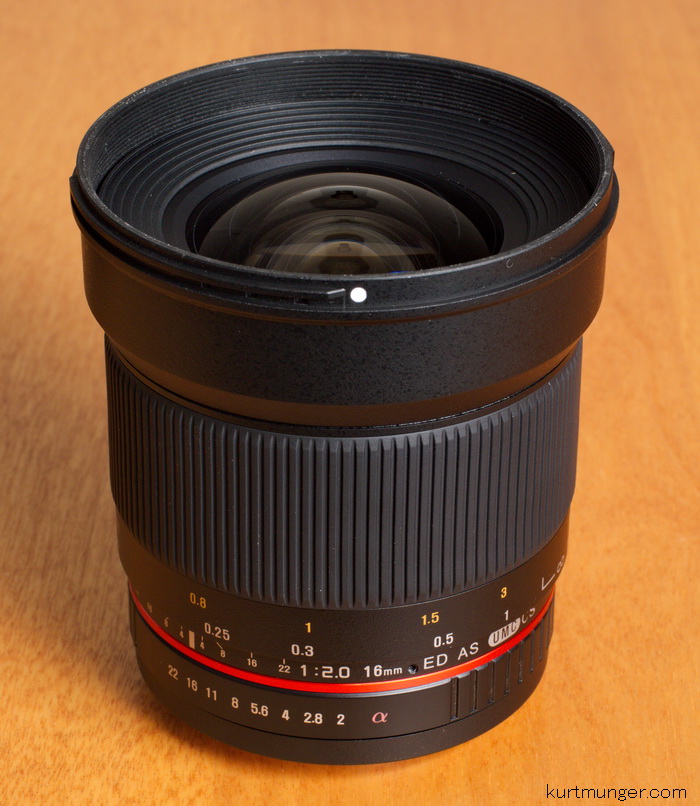
Requisite product shots.

late2013/r16f2sd.jpg
Side shot
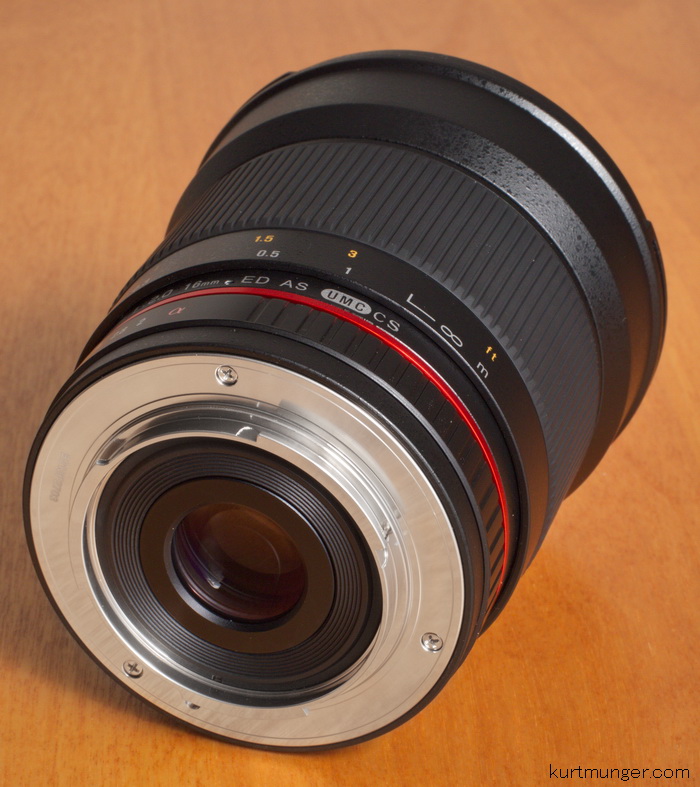
late2013/r16f2bk.jpg
Back side, no contacts

General information and specifications.

Lens
Rokinon 16mm F/2 ED AS UMC CS for Sony
Box contents
Front cap, rear cap, hood, carrying bag and users manual.
Cost
Approximately $429 depending on branding.
Build quality
Ok to good.
Additional information
Introduced in late 2013.  May also be marketed under the names; Falcon, Bowers, Samyang, Opteka, Pro Optic, Walimex, Vivitar.
Specifications below
Optical configuration
13 elements in 11 groups
Angle of view
83.1˚
Aperture
8 blades, slightly curved
Full frame and APS-C
Made for APS-C cameras, with equivalent coverage of about 24mm, Micro 4/3 about 32mm.
Depth of field and focus scales?
Yes, DOF, aperture index marks and focus distance scale.
Minimum focus, image plane to subject
About 7.9″  (200mm)
Minimum focus, end of lens barrel to subject
About 2.4″  (36mm)
Hard stop at infinity focus?
No, goes slightly beyond infinity.
Length changes when focusing?
No.
Focus ring turns in AF?
N/A
Filter size
77mm.
Filter ring rotates?
No
Distance encoder?
No
Max magnification
Approximately 0.18x or 1:5.5
Min. F/stop
F/22
Sony teleconverter compatible?
No
Length changes when zooming?
N/A
Dimensions WxL  (my measurements)
3.27″ x 3.5″   83mm x 89mm.
Maximum  extended length (my measurements)
3.5″  (89mm)
Weight bare (my scale)
19.9oz  (563g) bare.
Optical qualities summary.
Lens flare/ghosting.  About average control.  At large apertures I see some multi-colored rings that may ruin the image, but stopping down results in mostly isolated colored blobs when the sun is close to, or inside the shot, see examples below.
Light fall-off.  Heavy at F/2, but brightens up at F/2.8.  See samples below.
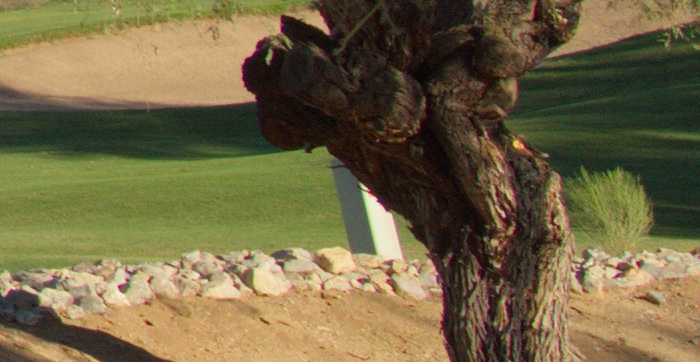
Color fringing (CA).  Lateral color fringing control is about average.  I see a little magenta and green at the edges of the image.  You see minor amounts of axial color fringing, but it clears up by F/4.
Bokeh.  Fairly smooth at large apertures, harsh at small apertures, see examples below.
Color.   seems slightly warmer (more yellow/orange) than Sony lenses.
Close up filter.  N/A
Coma.  almost none at F/2.
Regular filters cause no additional light fall-off on APS-C or full frame cameras.
Filter size.  77mm.  Sony uses this size on the CZ 24-70mm F/2.8, 70-200mm F/2.8 G, CZ 135mm F/1.8, 11-18mm F/4.5-5.6, and the 70-400mm G.
Distortion.  mild to moderate barrel distortion.
Distortion example directly below.
late2013/r16f2dis.jpg
Minor to moderate barrel distortion


The distortion is typical wide angle barrel, with the ends flattening out.  Mostly correctable (but not fully) in post processing with distortions sliders.


Bokeh samples.


           F/2
             F/2.8
late2013/r16f2bokf20.jpg
late2013/r16f2bokf28.jpg
           F/4
             F/5.6
late2013/r16f2bokf40.jpg
late2013/r16f2bokf56.jpg


Bokeh looks smooth at F/2, but does get a dot in the center at F/4 and smaller.  The octagonal aperture shape shows up when stopped down past F/4.


Light fall-off samples.
           F/2
              F/2.8
late2013/r16f2vigf20.jpg
late2013/r16f2vigf28.jpg
           F/4
              F/5.6
late2013/r16f2vigf40.jpg
late2013/r16f2vigf56.jpg

Light fall-off is somewhat heavy at F/2, but improves greatly at F/2.8.


Flare and ghosting.
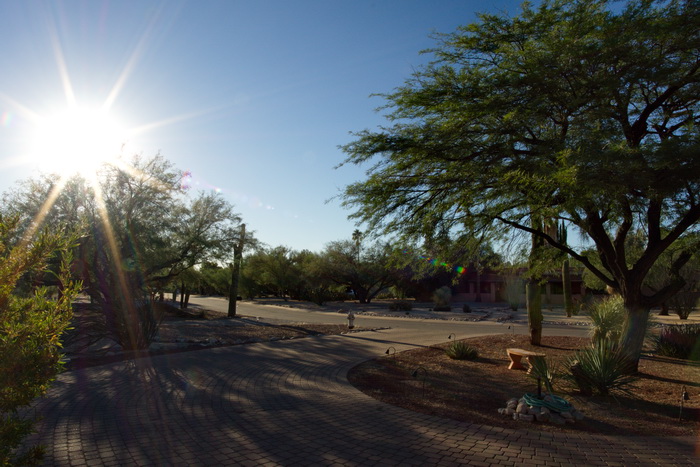
late2013/r16f2gstf11.jpg
F/11 or F/16, not sure.


Here’s a full scene that shows a sun star, flare, and multi colored ghosting.  Just be careful when shooting into the sun or other super bright light source.  I think this was taken at F/11 or F16, can’t remember exactly. 


Lateral color fringing.
late2013/r16f2cf.jpg


I see a little magenta and green along high contrast areas, like the tree trunk against the sand trap.  This is easy to remove in post processing when saving your files as RAW. 


Let’s check out the macro capabilities of this lens.


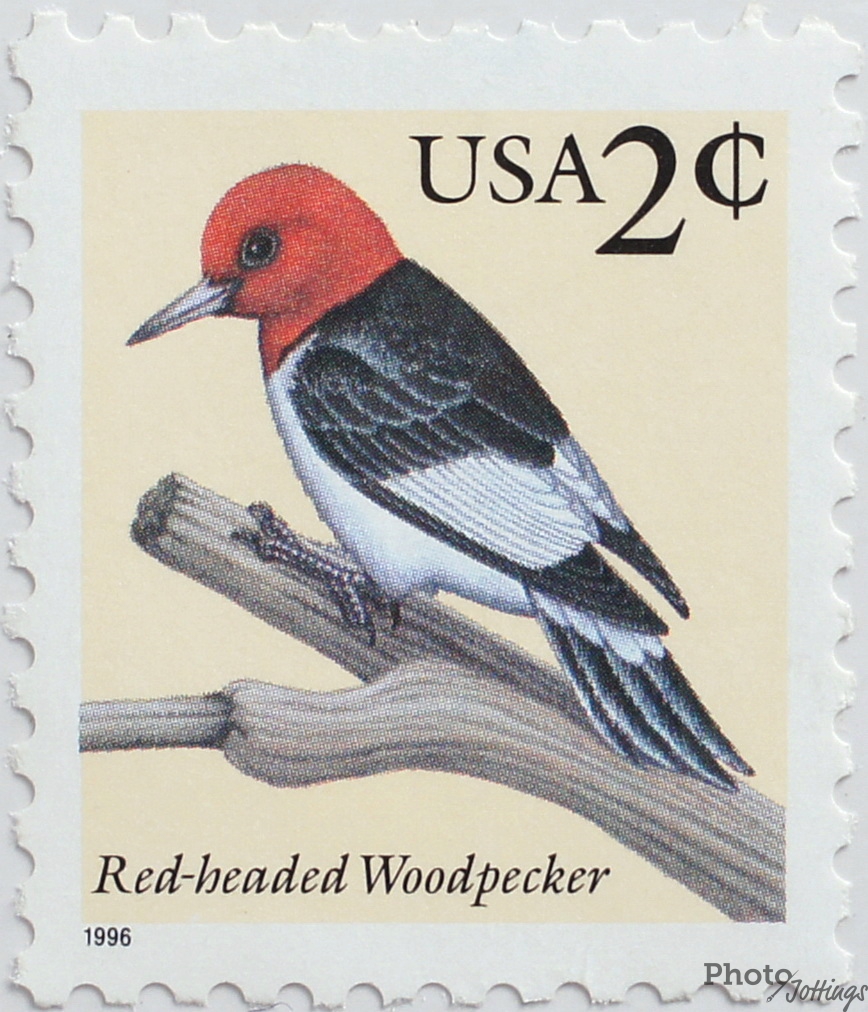
Below, check out the cropped image of the stamp.  The sample shot was taken with the Sony A 77 24MP camera.  The subject is a standard US stamp, 0.87″x 1.0″ or 22mm x 25mm.  Also, note the macro shot was taken as close to the subject as focusing allowed; in this case a short 2.4″ (36mm), measured from the front of the lens barrel to the subject.  
 
This lens has an approximate reproduction size of 0.18x (1:5.5) which is about average for today’s wide angle prime lenses.  The stamp shot looks pretty good, with nice color and contrast.   The lens is so close to the stamp it was hard to get the whole thing in focus, it’s slightly soft along the sides, mostly visible at the bottom left corner.  As a side note; the “1996” on the bottom left of the stamp measures a mere 1mm wide.  
As close as you can get, F/5.6.
Conclusion. 


Optically speaking, the Rokinon 16mm F/2 is excellent, but only in a narrow range, like F/4-5.6, stopping down to F/8 or smaller results in serious diffraction, and makes the image look soft.  At wide apertures, like F/2-2.8, the image is also soft, even in the centers, which I didn’t expect. A prime lens should be very sharp in the centers at F/2.8, however, along the sides one shouldn’t be so critical at these apertures.


In other areas, ghosting control is slightly below average, so watch out when the sun is near, or inside the image.  Color fringing control is noticeable along the sides of the image, but easy to correct in post processing when saving as RAW.  Close focusing results in a sharp image, but there isn’t much ‘working’ room as the front of the lens barrel is only a little over 2″ (50mm) from the subject, and if you have the hood on, it almost touches the subject!  Distortion as well as light fall-off patterns are pretty typical of a wide angle lens.  Coma control is excellent, and is not noticeable in real images.


Would I recommend this lens?  First off, I tested two copies of this lens, the first was very soft on the left side, the second copy was much better, but still a little soft on the left side, but I thought it was acceptable, and probably not noticeable unless you view crops side-by-side at 100% on your computer screen.  Here’s the problem; I doubt there is any ability to correct problems with this lens if there really is a problem, like a tilted element or de-centering etc, if you send it in, they’ll probably tell you it’s ‘in spec’ whether it’s sharp or not to you, and if it’s really off, they’ll send you another copy.  Good luck with that.   This lens is quite inexpensive, so you pay your money and take your chances, just like at the fair grounds.  To answer the question at the start of the paragraph, I probably wouldn’t recommend this lens, especially to the novice.  It’s manual focus, manual aperture control and may have quality control issues.  If you have experience with other manual only lenses, and don’t mind taking some chances, then you might wind up with a good lens.  There currently isn’t much else available for Sony ‘a’ mount users, so if this is your focal length, then you might give it a try.


Bottom line: a very good lens at F4-5.6, just mediocre everywhere else.  Sony ‘E’ mount users; spend less money and get something better, like the Sigma 19mm F/2.8, which isn’t quite as wide or fast, but it performs better over a broader range, and is much smaller and lighter.


Sample crops from the centers, mid-sections and corners.


          Center
          Mid-section
             Corner
F/2
late2013/r16ctrf20.jpg
late2013/r16midf20.jpg
late2013/r16cornf20.jpg
F/2.8
late2013/r16ctrf28.jpg
late2013/r16midf28.jpg
late2013/r16cornf28.jpg
F/4
late2013/r16ctrf40.jpg
late2013/r16midf40.jpg
late2013/r16cornf40.jpg
F/5.6
late2013/r16ctrf56.jpg
late2013/r16midf56.jpg
late2013/r16cornf56.jpg
F/8
late2013/r16ctrf80.jpg
late2013/r16midf80.jpg
late2013/r16cornf80.jpg
F/11
late2013/r16ctrf11.jpg
late2013/r16midf11.jpg
late2013/r16cornf11.jpg


I see soft wide-open results, in the centers as well as the sides, stopping down to F/2.8 brightens the image, but doesn’t really result in an increase in resolution.  Heading to F/4 the image sharpens up dramatically, and doesn’t get too much better in the centers by closing the aperture more, but the corners are a little sharper at F/5.6.  Resolution heads south fast beyond F/5.6, and looks bad at F/11.  Maximum performance is F/4-5.6, so the ‘window’ of best use is rather limited, especially for people that want to stop down for depth of field problems.  Exposure differences are from light fall-off.


Please check out the Rokinon 16mm F/2 using the links below and help support the site!  The lens is available in NEX ‘e’ mount and ‘a’ mount for Sony.


Full review of the Rokinon 35mm F/1.4 lens.

JUNE2011/rok3514kit.jpg
Box and contents
The Sony A580 and A900 were used for this review.  For a better understanding of terms and methods used in this review, go here.
The usual center, mid-section and corner crops are located at the very bottom of the page.
Introduction.
The relatively inexpensive Rokinon 35mm F/1.4 UMC aspherical lens was introduced in 2010, and is available for most major camera mounts, including Sony alpha.   It may also be found labeled walimex, Falcon, Opteka, Pro Optic, Vivitar, Bowers and Samyang.  I’m told Samyang of South Korea is the original manufacturer.  The lens says “made in Korea.”
Found on the outside of the lens is a plastic aperture ring and plastic manual focusing ring, no focus hold or limiter buttons.  Build materials of the body seems to be a mix of metal and plastic.  Build quality is generally good, with a good fit and finish.  Additionally, the plastic filter ring at the front that surrounds the front element is thin, and bends easily with finger pressure.  Make sure you don’t strip the threads when mounting a filter.  The lens body has an appealing black spatter paint finish.  Rokinon claims the use of one aspherical, and two “high refractive” elements in the design of the lens.
Use.  Make sure you select “enable” for “release W/O lens” on your camera, otherwise, the camera thinks no lens has been mounted, and won’t release the shutter.  This is a manual lens only, meaning there is no communication with the camera (on a Sony model), you must use manual focus, and choose an aperture.  Exposure metering is ok, but you’ll need to check your LCD after each shot and adjust for best results.  Also, white balance metering may change as you stop down the aperture; I’ve noticed it’s warmer at larger apertures, from F/1.4-2.8, and cools off at F/5.6 and smaller, so check you LCD if you’re shooting in Jpegs; with Raw it’s no big deal.  The aperture settings are marked in one stop increments between F/1.4-2, and F/16-22, everything in between is in half stops.  It is possible to use an in-between aperture, you’ll have to carefully turn the ring and set it between marked stops, although I don’t know why you’d want to do that.  The viewfinder is very dark when the aperture is set smaller than F/5.6.
Don’t set the lens down on the mount side without a cap when the focus is set to infinity, if you do the rear element will touch the surface and the lens will wobble around and fall over.
Note; bright daytime use at F/1.4 will often result in having to use a shutter speed of 1/8000 at ISO 100.  Most consumer grade cameras don’t have that shutter speed, (the pro bodied Sony A700/A850/A900 do) so you’ll need to use a neutral density filter to bring down the light value and get the proper exposure.
The aperture blades form a nice circle between F/1.4-2, however, from F/4-22 the hole increasingly becomes octagonal.
EXIF data reads 0mm for focal length, and F/1 for aperture.  The live view screen will read F– with no aperture.
In the box is the lens, front and rear caps, plastic petal type hood, a stinky black fake velvet carrying pouch and owner’s manual.
Focusing.  Manual focusing only.  The focusing ring is damped perfectly in my opinion, and is pretty easy to turn with one finger.   Focus ring travel is over 1/3 of a turn form close-up to infinity, which is a good amount of travel, but precise focusing (at less than infinity distances) at F/1.4-2 requires practice (and luck) as you can’t see the difference in the viewfinder, even with an “M” focusing screen.  My copy delivered proper focus when set at the infinity hard stop mark.
Requisite product shots.
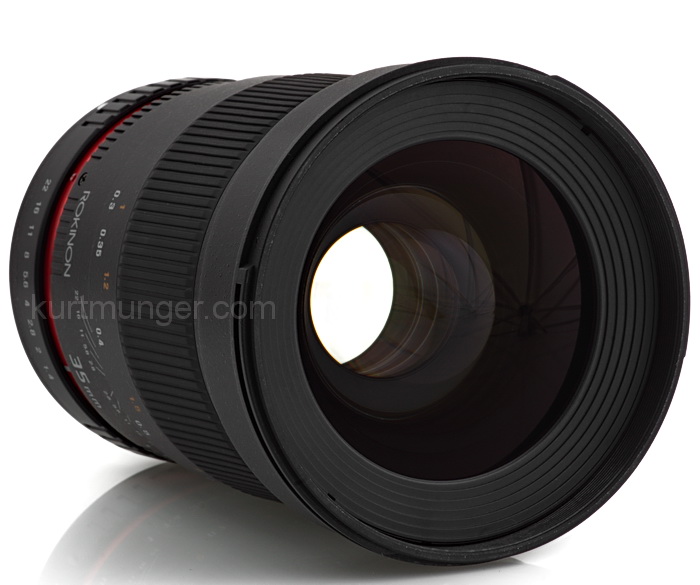
JUNE2011/rok3514sd.jpg
Side shot
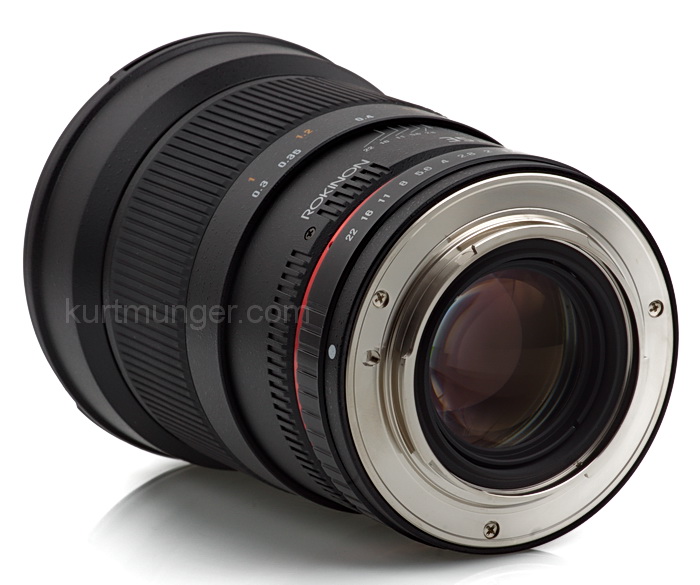
JUNE2011/rok3514bk.jpg
Back side, no contacts
JUNE2011/rok3514ft.jpg
Flimsy plastic filter threads
JUNE2011/rok3514glass.jpg
Samyang X-ray view

General information and specifications.

Lens
Box contents
Front cap, rear cap, hood, carrying bag and users manual.
Cost
Approximately $499
Build quality
Ok to good.
Additional information
Introduced in late 2010.  May also be marketed under the names; Falcon, Bowers, Samyang, Opteka, Pro Optic, Walimex, Vivitar.
Specifications below
Optical configuration
12 elements in 10 groups
Angle of view
63.2˚ full frame,  43.3˚ APS-C=1.5x
Aperture
8 blades, slightly curved
Full frame and APS-C
Made for full frame, but works fine on APS-C cameras, with equivalent coverage of about 52mm.
Depth of field and focus scales?
Yes, DOF, aperture index marks and focus distance scale.
Minimum focus, image plane to subject
About 12″  (305mm)
Minimum focus, end of lens barrel to subject
About 7.25″  (184mm)
Hard stop at infinity focus?
Yes, and my copy focuses properly at the hard stop.
Length changes when focusing?
No.
Focus ring turns in AF?
N/A
Filter size
77mm.
Filter ring rotates?
No
Distance encoder?
No
Max magnification
About 0.20x or 1:5
Min. F/stop
F/22
Sony teleconverter compatible?
No
Length changes when zooming?
N/A
Dimensions WxL  (my measurements)
3.27″ x 4.37″   83mm x 111mm.
Maximum  extended length (my measurements)
4.37″  (111mm)
Weight bare (my scale)
23.5oz  (667g) bare.
Optical qualities summary.
Lens flare/ghosting.  About average control.  At large apertures I see some multi-colored rings that may ruin the image, but stopping down results in mostly isolated colored blobs when the sun is close to, or inside the shot, see examples below.
Light fall-off.  large amounts on full frame at F/1.4, but brightens up at F/2.  See samples below.
Color fringing (CA).  Lateral color fringing control is way above average.  I see just a tiny bit of magenta and green at the edges of the image.  You see minor amounts of axial color fringing, but it clears up by F/4.
Bokeh.  harsh at F/1.4, but smooths out when stopped down, see examples below.
Color.   seems slightly warmer (more yellow/orange) than Sony lenses.
Close up filter.  N/A
Coma.  None.
Regular filters cause no additional light fall-off on APS-C or full frame cameras.
Filter size.  77mm.  Sony uses this size on the CZ 24-70mm F/2.8, 70-200mm F/2.8 G, CZ 135mm F/1.8, 11-18mm F/4.5-5.6, and the 70-400mm G.
Distortion.  mild to moderate barrel distortion.
Distortion example directly below.
JUNE2011/rok3514dis.jpg
Minor barrel distortion


Distortion is not a problem with this lens.


Bokeh samples.


           F/1.4
             F/2
JUNE2011/rok3514bok14.jpg
JUNE2011/rok3514bok20.jpg
           F/2.8
             F/4
JUNE2011/rok3514bok28.jpg
JUNE2011/rok3514bok40.jpg


Bokeh looks a little harsh at F/1.4, but does smooth out nicely at F/2.  The octagonal aperture shape shows up when stopped down past F/4.


Light fall-off samples.
           F/1.4
              F/2
JUNE2011/rok3514vig14.jpg
JUNE2011/rok3514vig20.jpg

Light fall-off is somewhat heavy at F/1.4, but improves greatly at F/2.


Let’s check out the macro capabilities of this lens.


Below, check out the cropped image (322kb) of the stamp.  The sample shot was taken with the Sony A 580 16.2MP camera.  The subject is a standard US stamp, 0.87″x 1.0″ or 22mm x 25mm.  Also, note the macro shot was taken as close to the subject as focusing allowed; in this case a short 7.5″ (184mm), measured from the front of the lens barrel to the subject.
This lens has an approximate reproduction size of 0.20x (1:5) which is about average for today’s wide angle prime lenses.  The stamp shot looks ok, but lacks contrast, (actually it sucks).  There was little difference between F/4-8.  As a side note; the “1996” on the bottom left of the stamp measures a mere 1mm wide.
As close as you can get, F/5.6.


_______________________________________________________________________


Full frame results using the Sony A900 below.


Check out the differences when using a film or full frame camera below.  I’m only pointing out the noticeable issues as compared to the APS-C bodies, so if I don’t show it here, the results are not significantly different enough to warrant posting an additional set of images in this section.


Light fall-off


            F/1.4
              F/2
JUNE2011/rok3514ffvig14.jpg
JUNE2011/rok3514ffvig20.jpg
           F/2.8
              F/4
JUNE2011/rok3514ffvig28.jpg
JUNE2011/rok3514ffvig40.jpg


I see heavy light fall-off at F/1.4.  However, by closing the aperture just one stop, the frame lightens up tremendously.  There’s enough light fall-off at F/1.4 to possibly mess up your auto-exposure system, make sure you don’t over expose the middle area.


Full image below illustrating light fall-off from A900.


JUNE2011/3514vigffover2.jpg
F/1.4, ISO 100, 1/3200sec.


Here’s a full scene that shows actual-use light fall-off with the lens wide open. Dark corners are not really noticeable, but be careful when using F/1.4, make sure the centers are not over-exposed, as they are slightly in this shot!  Data for the image is; F/1.4, 3200sec, ISO 100.

Flare and Ghosting.


Ghosting with lower left corner arc and multi colored blob, F/5.6.
Small rainbow, F/5.6.
JUNE2011/3514ffviga.jpg
JUNE2011/3514ffvigb.jpg
When the sun is in the image, there are multi-colored (or rainbow) blobs visible, but severity depends on angle and aperture.  At F/1.4-2, you’ll see some large rings opposite the sun.  When the sun is out of the image there are still minor ghosting problems, so use your hand as a light block, which works better than the included hood.
Full frame distortion.
JUNE2011/rok3514ffdis.jpg
Moderate barrel distortion on A900


Full frame coverage shows moderate barrel distortion, with a simple signature, and can be mostly corrected with distortion repair sliders.


Real-world close focus shot.


JUNE2011/3514bokffcactx.jpg
Detail from center of image.


This close focus shot at F/1.4 looks good, and doesn’t show a lack of contrast like the stamp shot does.  I see a smooth, de-focused background, but this isn’t bokeh, it’s just out of focus, along with a wide aperture.

Coma samples.
           F/1.4
              F/2
JUNE2011/rok3514cma14.jpg
JUNE2011/rok3514cma20.jpg

This lens produces no coma!  I find this very surprising as even the newest lenses from Sony of this type have much more than you see here.  Coma takes the form of weird, smeared blobs at points of light in the corners of the image, especially in wide angle lenses.  The Christmas tree lights here show nothing of any consequence, although I do notice the corners are very sharp at F/1.4!  100% crops from the far corners.  Exposure differences are from light fall-off.


Conclusion. 


The Rokinon 35mm F/1.4 was unveiled in 2010 with much fanfare, and as of mid 2011, is available for the Sony “α” mount.


Optically speaking, the Rokinon 35mm F/1.4 is excellent, with very high sharpness at almost all apertures, low distortion, minimal light fall-off at F/2, and no coma, even in the far corners at F/1.4!  Probably the biggest drawback for most people is the fact that it’s a manual only lens, meaning there is no communication between the lens and camera (Sony models), so if you aren’t familiar with using full manual controls, you might want to skip this lens until your skills improve.


The Rokinon 35mm F/1.4 is best used on a full frame camera, therefore, I can’t recommend it for APS-C models.  Why?  The Sony DT 35mm F/1.8 SAM is sharper in the centers at all apertures, and stopped down a little will match the mid-sections and corners of the Rokinon.  Additionally, the Sony is very small and light-weight, with full auto focusing and metering, and costs less than half of the Rokinon.  I’ve been bragging up the Sony 35/1.8 SAM since it was introduced, and you can see why by checking out the comp at the bottom of the review!


I didn’t have the Sony 35/1.4 G on hand for this review, but I’m pretty sure the Rokinon is much sharper all around at F/1.4-2.


Sample crops from the centers, mid-sections and corners using the full frame Sony A900.


          Center
          Mid-section
             Corner
F/1.4
JUNE2011/3514ffctr14.jpg
JUNE2011/3514ffmid14.jpg
JUNE2011/3514ffcorn14.jpg
F/2
JUNE2011/3514ffctr20.jpg
JUNE2011/3514ffmid20.jpg
JUNE2011/3514ffcorn20.jpg
F/2.8
JUNE2011/3514ffctr28.jpg
JUNE2011/3514ffmid28.jpg
JUNE2011/3514ffcorn28.jpg
F/4
JUNE2011/3514ffctr40.jpg
JUNE2011/3514ffmid40.jpg
JUNE2011/3514ffcorn40.jpg
F/5.6
JUNE2011/3514ffctr56.jpg
JUNE2011/3514ffmid56.jpg
JUNE2011/3514ffcorn56.jpg
F/8
JUNE2011/3514ffctr80.jpg
JUNE2011/3514ffmid80.jpg
JUNE2011/3514ffcorn80.jpg
F/11
JUNE2011/3514ffctr11.jpg
JUNE2011/3514ffmid11.jpg
JUNE2011/3514ffcorn11.jpg


I see soft wide open results, mostly due to a lack of contrast, however, there’s plenty of detail present.  When you stop down to F/2-2.8 the image sharpens up dramatically, and doesn’t get too much better by closing the aperture more.  Diffraction is noticeable at F/8-11.  Maximum performance seems to be around F2.8-4 in the centers, and F/4-5.6 for the mid-sections and corners, that’s excellent for a full frame lens, or any lens for that matter.  Sony A900 tested.  Exposure differences are from light fall-off.


Please check out the Rokinon 35mm F/1.4 at B&H Photo and help support the site!


___________________________________________________________________________________________________________________________


Bonus section using the Sony A580 APS-C camera.


I’ve worked up a direct comparison using the Rokinon 35/1.4 and Sony 35/1.8 SAM lenses.  The distance from camera to subject is about 40′ (12.0m).  The Sony A580 was used for this comparison, along with a tripod, remote shutter and the white balance set to 5900k.  Bracketed manual focusing was used, with the resulting absolute sharpest shot used as the base for the entire set, at each length.  Exposure differences are from light fall-off.  All camera settings were the same for each lens.

Centers

          Rokinon 35mm F/1.4
          Sony 35mm F/1.8 SAM
F/2
JUNE2011/3514ctr20.jpg
JUNE2011/3518ctr20.jpg
F/2.8
JUNE2011/3514ctr28.jpg
JUNE2011/3518ctr28.jpg
F/4
JUNE2011/3514ctr40.jpg
JUNE2011/3518ctr40.jpg
F/5.6
JUNE2011/3514ctr56.jpg
JUNE2011/3518ctr56.jpg
F/8
JUNE2011/3514ctr80.jpg
JUNE2011/3518ctr80.jpg


I see the cheap Sony lens is sharper in the centers at all apertures, but not all that noticeable beyond F/2.8.  All crops have the exact same camera settings.  Color differences are caused by the lenses.


Mid-sections


          Rokinon 35mm F/1.4
          Sony 35mm F/1.8 SAM
F/2
JUNE2011/3514mid20.jpg
JUNE2011/3518mid20.jpg
F/2.8
JUNE2011/3514mid28.jpg
JUNE2011/3518mid28.jpg
F/4
JUNE2011/3514mid40.jpg
JUNE2011/3518mid40.jpg
F/5.6
JUNE2011/3514mid56.jpg
JUNE2011/3518mid56.jpg
F/8
JUNE2011/3514mid80.jpg
JUNE2011/3518mid80.jpg


If you look really close, the Rokinon seems to be a bit sharper at wide apertures, but they’re about the same at F/4 and smaller.


Corners


          Rokinon 35mm F/1.4
          Sony 35mm F/1.8 SAM
F/2
JUNE2011/3514corn20.jpg
JUNE2011/3518corn20.jpg
F/2.8
JUNE2011/3514corn28.jpg
JUNE2011/3518corn28.jpg
F/4
JUNE2011/3514corn40.jpg
JUNE2011/3518corn56.jpg
F/5.6
JUNE2011/3514corn56.jpg
JUNE2011/3518corn56.jpg
F/8
JUNE2011/3514corn80.jpg
JUNE2011/3518corn80.jpg


The Rokinon is clearly sharper in the corners at F/2-2.8, but both are about the same beyond that.  The Rokinon is a full frame lens, and the Sony is an APS-C lens, so the Sony is at a clear disadvantage in the corners.

If you own a digital SLR, sooner or later there’ll come a time when you realize the sensor is dirty.  Most often dust shows itself as tiny dark blotches against a bright uniform background.  A major problem area can be macro shots as you stop down the aperture to gain some depth of field.  The reason it tends to show up at higher F-numbers is that the dust is not actually on the sensor itself rather, it rests against the sensor filter, which is a short distance directly in front of the sensor.  So at low F-numbers (large apertures) F/4 to F/8 or more, the light coming in naturally goes around the dust.  At small apertures, such as F/16 on up, light coming in is so restricted it casts the hard shadow and tends to get your attention.

Picture this.  You’re standing by a very large window in a large room.  Your shadow will be very soft at the back wall as the light coming in covers a much broader area than you do.  Now imagine the large window is replaced with a small, spot light sized area that you’re standing in front of.  You will now cast a harsh shadow against the back wall.  The back wall is the sensor and you are the dust.

Let’s move on now to some real examples.  Look at the dust particles in the picture below.

october08/f11sca.jpg
F/11
october08/f32sca.jpg
F/32
october08/f32scaver.jpg
Massaged in photoshop to enhance dust, F/32
The dust specks visible here aren’t too awfully bad in the top shot, F/11, in the middle shot at F/32 it looks bad.  If I would have opened the aperture to less than F/8, it probably wouldn’t be noticeable, especially with the whole image filled with an interesting subject, instead of blank sky .  I used a smooth sky to accentuate the dust for these test photos.  If you are making small prints, dust isn’t a big deal, viewed at 100 percent they are quite unsightly, yet if I wanted to, I could use my photo editing software and get rid of the dust specks quickly.  When I first noticed dust on my sensor, it was 10 times worse than this! 

If you want to check your camera for dust, here are a few simple steps to take.  Set the ISO to 100 or the lowest setting.  Set the aperture to at least F/22 or higher.  Turn off the anti-shake or any other image stabilizing feature.  The reason for this is so we can get a nice smooth, uniform exposure.  Make sure you have a good second or so exposure time.  Point the camera at a light colored even surface, a wall or the sky, maybe a gray card.  Move the lens around during the exposure also.  Take a few different shots just to be sure.  Be careful not to over-expose the shot as that will wipe out the dust specks.


Now let’s try to adjust our test pictures using any standard photo editing software, such as what came with your camera.  The simplest way to enhance the pictures to detect dust is to run up the contrast as far as you can.  I desaturated the pictures also.  To really maximize the visibility you can “squeeze” the histogram, but sometimes you can go overboard with this enhancement and make it look really horrible.  If you did this test correctly, and see dust specks at no increase in contrast, or worse yet, you can see dust in the cameras LCD viewing screen, then I would recommend a good cleaning.
Most owner’s manuals will probably recommend using only a blower brush or blower bulb, and, when using the bulb or brush for cleaning, not to extent the blower tip beyond the camera housing.  My new Sony a 100 manual says to use a blower brush, but not to touch the CCD with the brush.  When recommending the brush, they won’t tell you to brush off the sensor.  These recommendations by the manufacturers are to be expected, as these cleaning methods will result in the least possible chance of doing any damage to the camera.  From my experience, these methods will also produce the least possible chance of a successful cleaning.  If you’re the kind of person that doesn’t like to open things up, like your expensive camera, I’d stop at this point and call in a professional.  There’s always a chance you could fail at your attempt.  I’m not the kind of person to “hire” much of anything out, so I’m going to show you how I do my cleaning.
There are many products available for sensor cleaning; swabs, vacuums, fancy brushes and complete kits costing over $200.  I use the brush.  Before I cleaned my first sensor I read everything I could find, either over the internet or in the bookstores.  I came to the conclusion that my safest bet would be the small, cosmetic type brushes available in any drugstore.  You can buy a liquid type cleaner with a swab, but I can picture cleaning my windows in the house and afterwards looking at them with the sun shining through and seeing all the smears and smudges, but that’s just me.  I’ve used the brush method many times and have noticed no issues with scratching, smearing, or any other degradation in picture quality.

One more point to ponder.  If you’re still hesitant about doing this, remember, you will be cleaning the filter that is in front of the sensor, not the sensor itself.   I’ve been told this may be much less expensive to have replaced than the entire unit.  I think I’ve covered all the warnings pretty well, so let’s get started.

october08/sca2c.jpg
Bulb and brush used for this article
To prepare for the cleaning, make sure you fully charge the camera battery.  This will ensure the camera is able to hold the mirror up and out of the way so you can access the sensor.  Also make sure you turn off all dust producing sources, such as fans, and close all open windows in the room.  You do not want to add any more dust than you already have.  Now get out your brand new brush and a blower bulb.  Be sure not to touch the bristles with your fingers.  Caution: don’t use an acid brush from a hardware store, the bristles are too course and there are too many contaminates to deal with.  Only use a very fine bristled brush, mine are all make-up or cosmetic brushes.  You may want to go ahead and purchase a special brush made specifically for cleaning sensors.  If you think it will lower your stress level and give you more confidence, I would suggest buying one at this point.  It will also set you back close to $100 for a good one.  When I started out cleaning my sensor I didn’t have that much money to spend, hence, I chose a less expensive alternative.
When you remove the brush from the packaging, you’ll want to make sure there are no contaminates on it.  To do this, simply swipe the bristles carefully over a clean surface, like on a camera lens or filter.  Look for any smears, smudges or streaks left by the bristles.  If you see none, then you’re ready to proceed.  If you do see leftover residue, stop and attempt to clean the brush with a very light soap and water solution and let dry, then repeat the test.   I’ve never had to clean any brushes, so you may want to try another brand if you’re worried about leaving residue behind.  That’s what I would do.
Now we’ll get the camera ready.  Put the camera in the “clean sensor mode” or whatever your camera tells you to do.  This setting will lock the mirror up as I said before, allowing you plenty of time for the task.  Warning; do not simply set the shutter speed for a long exposure or set to bulb mode, disaster will surely follow.  Look at the picture below.  The sensor is the greenish looking rectangle, not to be confused with the mirror, which is up and out of the way in the picture below.  Remove the lens or body cap.  Next, prepare your brush by blowing air across the bristles using the blower bulb.  The scene should appear similar to the one below.
october08/scakmsen.jpg
Ever so carefully, stroke the sensor with the bristles while applying very little pressure.  Move in one direction only and make only one pass per area.  My brush was not as big as the sensor so I made two passes, and went in the same direction each time.  The first pass was at the top, from left to right, then followed up by a second pass at the bottom, left to right.  The brush bristles should just be touching the sensor area.  Now, reattach the lens or body cap, turn off the power and perform the initial photographic test again, using the same procedure.  If you have a little too much dust left over for your taste after re-checking, perform the cleaning again.  I’ve never had to do this more than two times.
october08/f32scaver.jpg
Compare the top (before) and below (after) cleaning, F/32
october08/f32scafnl.jpg
F/32
october08/f11scfnl.jpg
F/11 shows very smooth, no dust visible.
That second to the bottom shot looks pretty clean to me, so I think I’m done with this session.  There’re a few really tiny spots that show here, but you’ll never see those in any of your real-world photos.  I did the cleaning again and got rid of those two spots in the upper left corner, but you could just leave that little bit and forget it. The bottom shot at F/11 shows the final result.  Look at the test shot below of the brand-new, just hours old Sony a100  for comparison.
My total time for cleaning, including gathering the brush, fresh battery and blower bulb was less than five minutes. It took more time to take the series of test shots than it did for the whole cleaning!
As I said earlier, the procedure described here works well for me, your experience may vary.  Read some articles on sensor cleaning on other websites or ask someone for advice down at your local camera shop before making your final decision. I’m not an authority in the camera world, so if you have some useful information, opinions or comments, please feel free to email me.  Thanks for visiting.
october08/newsensor2.jpg
Brand new Sony a 100 sensor. A few specks slightly visible

Results of “short” focusing for sharper shots using the Sony 20mm F/2.8 lens.

I’ve noticed on several lenses that by “short” focusing (which I’ll call it in this article) you may be able to gain some sharpness.  The reason I’m using the Sony 20mm F/2.8 for this article is because it shows the most improvement by using this focusing method as any other lens I’ve tested.
By “short” focusing, I mean focusing slightly short (in distance), or in front of the subject as indicated below.
The Sony A900 was using in this review.
Check out the center crops below.
Infinity focus                                                                   Adjusted focus point
          F/5.6
          F/5.6
March2010/sfa56.jpg
March2010/sfa56t.jpg
          F/8
          F/8
March2010/sfa80.jpg
March2010/sfa80t.jpg
          F/11
          F/11
March2010/sfa11.jpg
March2010/sfa11t.jpg


The left crops show how the image looks by leaving the focus at the infinity mark as the auto-focusing system chose.  The right crops show the sharpness improvements by adjusting the focus point in front of the subject.


Below is a chart I made up (yeah, I know, poor infinity symbol) showing the sharpest focusing points at each aperture for the Sony 20mm F/2.8 lens.


March2010/infsymbol.jpg


The image above represents the infinity mark on the standard Sony or Minolta lens, and the white lines indicate where the focus index mark should be relative to the infinity mark, at each aperture.  Hopefully I’ve explained that properly!


This image or chart shows where I indexed the focus point at each aperture to get the sharpest shots.  First off, the test subject was taken at infinity focus, and the auto-focus system rolled the focus all the way to the infinity mark.


Let’s start off at F/2.8.  At this aperture, leave the focus at the infinity mark, if you move it just a hair off, the whole shot will be a blurred mess.  At F/4 you should also leave the focusing at the infinity mark, but you may be able to eke out a little extra sharpness by backing it off a tiny bit.  F/5.6 shows a noticeable gain by short focusing to the middle of the first “bow” of the infinity mark.  As you near F/8, focus almost to the start of the first “bow” and you can see obvious improvements in sharpness, and at this aperture, you see the biggest gain by short focusing.  As you move down to F/11, there isn’t quite as much improvement by using this technique, (but still noticeable), and F/16 softens due to diffraction, and shows no sharpness gain.  I noticed no difference in corner sharpness.


Please keep in mind the results above are from the Sony 20mm F/2.8, some other lenses (other than the Sony 20mm) may show much less sharpness gain, or more likely, none at all.  As always, experiment with your own lenses to see if in fact they do respond to short focusing, and by how much, and at what focus point etc.


Again, please don’t use this method unless you’re willing to take the time to ensure proper results, if used recklessly, your pictures will be a blurred mess.

Recommended Cameras and Lenses

You probably clicked on this page because you’re trying to find the right Sony camera and related equipment to help you take better pictures, but may not really know what to choose.  Below is a list of items that I find particularly useful, and personally recommend, because I own most of them.  This isn’t my personal wish list, it’s stuff …

Read more »

Rogue Flashbenders and GF Lightsphere Review

Wedding and party photographers (and regular photographers too!) may want to check out the items below, both do a good job of diffusing the light from a direct flash blast, and make the subject in your pictures look a little better.  I purchased the Gary Fong lightshpere a couple of years ago, and it actually works well, although it looks …

Read more »

Rogue 3 in 1 Honeycomb Grid Review

Rogue makes some pretty neat products, most of which are actually useful for the average photographer.  The 3 in 1 honeycomb grid is designed to fit over a standard camera accessory flash unit, and provides a way to control the coverage of light that falls on the subject.  Grids are better than snoots, although the difference is sometimes subtle.  check …

Read more »

Rokinon 16mm F/2 Review

Full review of the Rokinon 16mm F/2 lens, also labeled Samyang.

Box and contents The Sony A77 was used for this review.  For a better understanding of terms and methods used in this review, go here. The usual center, mid-section and corner crops are located at the very bottom of the page. Introduction. The wide angle and relatively inexpensive…

Read more »

Sensor Cleaning

If you own a digital SLR, sooner or later there’ll come a time when you realize the sensor is dirty.  Most often dust shows itself as tiny dark blotches against a bright uniform background.  A major problem area can be macro shots as you stop down the aperture to gain some depth of field.  The reason it tends to show …

Read more »

Short Focus for Sharper Shots

Results of “short” focusing for sharper shots using the Sony 20mm F/2.8 lens.

I’ve noticed on several lenses that by “short” focusing (which I’ll call it in this article) you may be able to gain some sharpness.  The reason I’m using the Sony 20mm F/2.8 for this article is because it shows the most improvement by using this focusing method…

Read more »

Scroll to Top